Skip to content
Souvéa
START WITH SOUVÉA

PERSONAL AI, ON YOUR TERMS

Choose how AI works for you.

Souvéa connects the information you choose. Use different AI models and processing countries without starting over. Create agents for your own work, or Spaces where people and AI can work together.

Your data stays yours. AI comes to it. Not the other way around.

Available on iPhone and web.

Souvéa

PERSONAL

You

What should I get ready for tomorrow?

Souvéa

Two meetings before noon, a train at four and a note you saved about the weekend trip. The rest can wait.

A Souvéa conversation, recreated with example content.
  • ConnectedCalendar and health
  • ProcessingModel and country you pick
  • TogetherAgents and Spaces

A DIFFERENT KIND OF PERSONAL AI

Your personal AI should not depend on one model, one cloud or one company.

Souvéa creates a personal context that can work with different models, agents and people. You can change the intelligence used for a task without rebuilding your digital life around another platform.

  1. YOUR INFORMATION

  2. YOUR SOUVÉA CONTEXT

  3. THE AI OR AGENT YOU CHOOSE

  4. A RESULT RETURNED TO YOU

WHAT YOU GET

Four things Souvéa puts in your hands.

YOUR CONTEXT

AVAILABLE TODAY

Connect the information that matters.

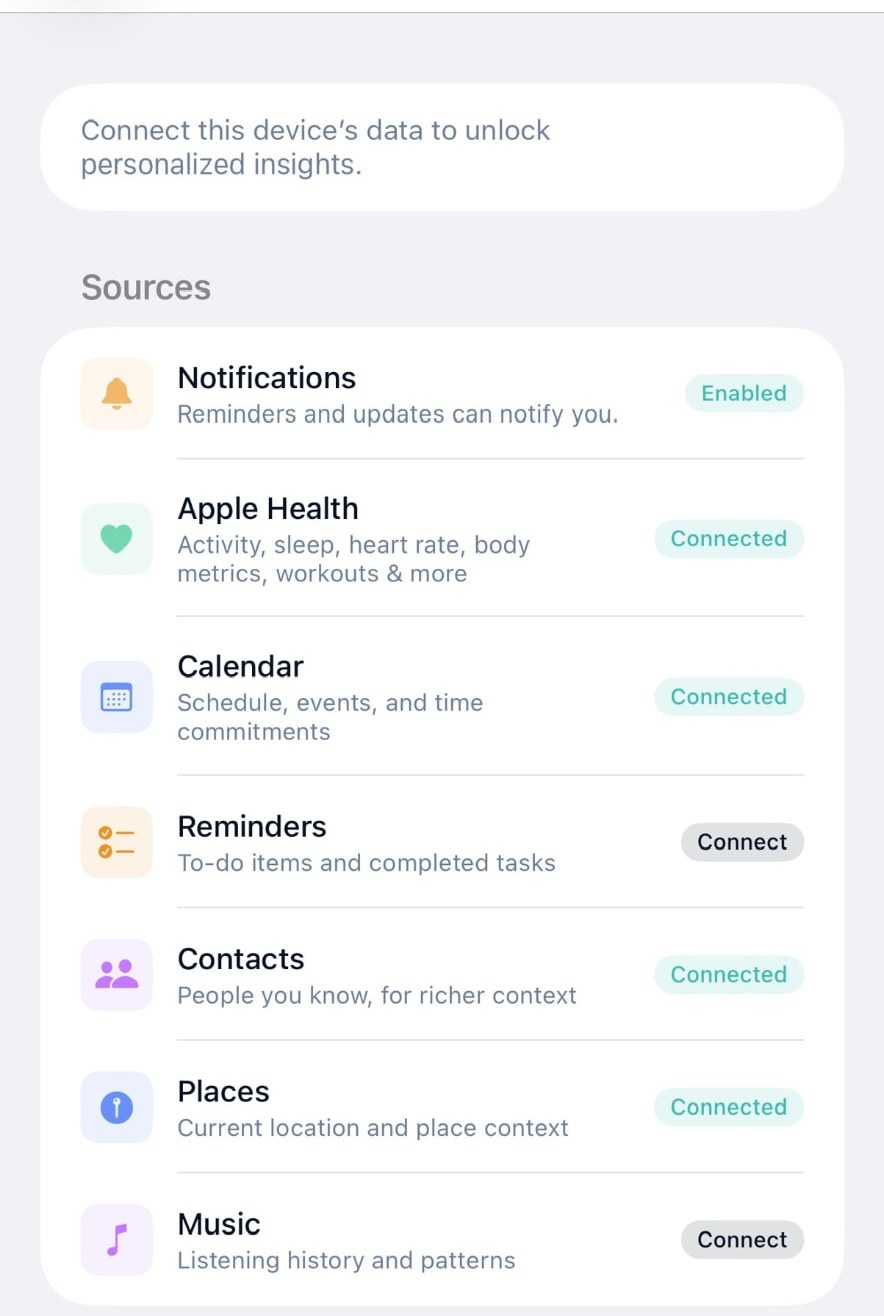
Bring together the personal sources you choose, from email and calendar to notes, health and places. You decide what connects.

  • Device sources
  • Gmail and Outlook
  • Notes and files
  • Inspectable memory

The Device sources screen in Souvéa, listing Notifications, Apple Health, Calendar, Reminders, Contacts, Places and Music, each with a connect or connected control.

YOUR CHOICE OF AI

AVAILABLE TODAY

Choose the AI for the task.

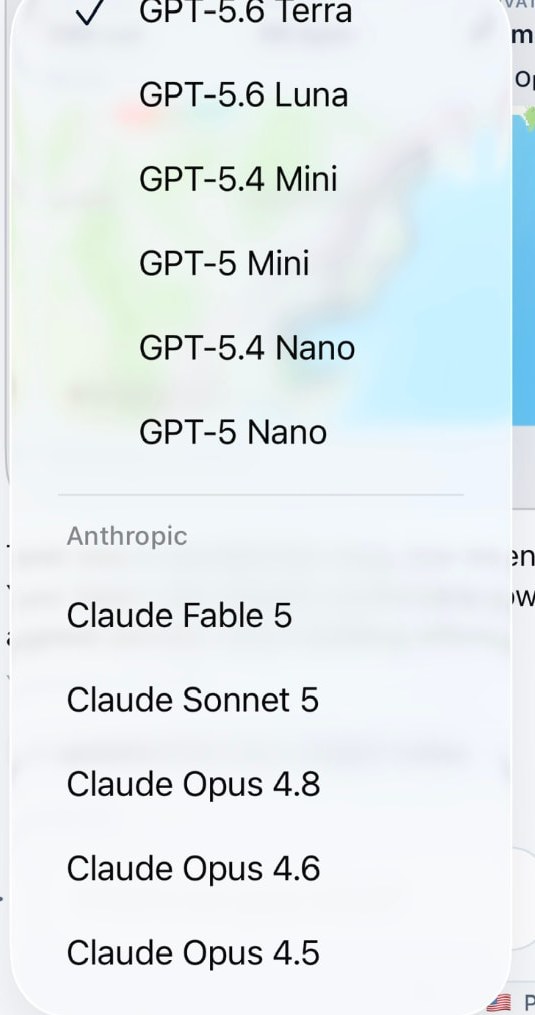
Different tasks can benefit from different AI models. Souvéa lets you move between supported models and providers without rebuilding your personal context.

  • Model choice
  • Provider choice
  • Processing country
  • Personal provider keys

Availability varies by model, provider and region.

EVERY AI REQUEST GOES SOMEWHERE

Do you know which model handles yours, and in which country it is processed?

Souvéa makes the selected model and processing country visible. Where supported, you can change both for each conversation.

Model
Claude Sonnet
Processed in
Germany

Where your connected information is stored and where an AI request is processed are different questions. Souvéa helps make the difference visible.

The Souvéa model picker open in the app, listing supported models from several providers with one of them selected.

Examples of processing countries shown in Souvéa.

A Souvéa message footer showing the selected model and Sweden as the processing country.A Souvéa message footer showing the selected model and Germany as the processing country.A Souvéa message footer showing the selected model and Switzerland as the processing country.

YOUR AGENTS

AVAILABLE TODAY

Create the right intelligence for the task.

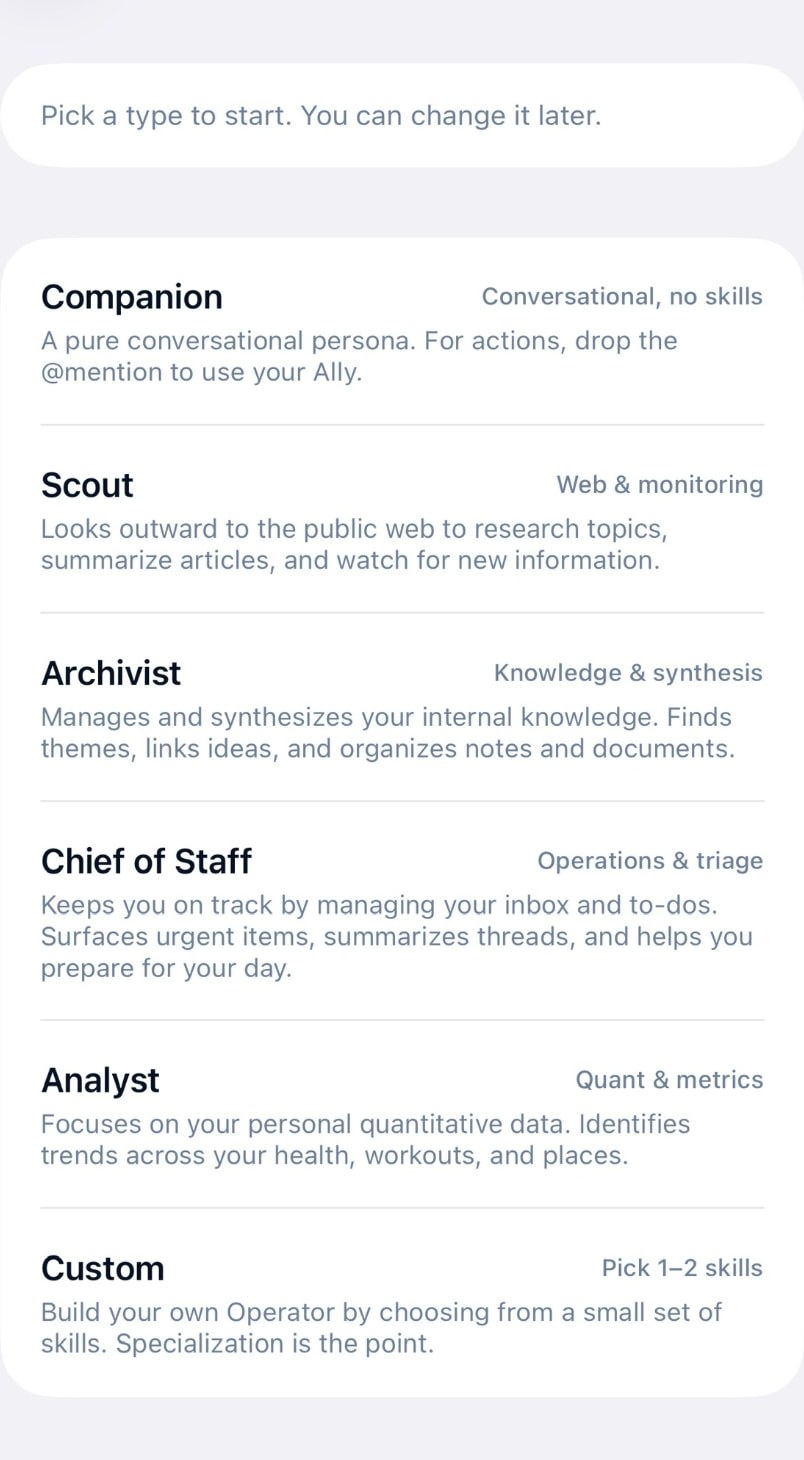
Use agents for research, monitoring, knowledge and coordination. Choose a ready role or create one with the skills you need.

  • Scout
  • Archivist
  • Analyst
  • Chief of Staff
  • Custom

Agents work within the permissions you give them.

The New agent screen in Souvéa, offering Companion, Scout, Archivist, Chief of Staff, Analyst and Custom agent types with a short description of each.

YOUR SPACES

AVAILABLE TODAY

Work privately or bring people together.

Create a Space as easily as a group conversation. Invite people, share selected information and work with Souvéa or specialist agents together. Everything outside the Space remains personal.

  • Invited members
  • Shared conversation
  • Selected information
  • People and AI together

Each person keeps the rest of their personal context separate.

EXPLORE SPACES

Weekend trip

3 members

SHARED
  • People
  • Souvéa (selected)
  • Agent

Maya

Can we leave on Friday afternoon instead?

Leo

Works for me. I shared the booking note.

Souvéa

Friday afternoon is free for everyone who joined this Space. I can hold two options and ask before anything is booked.

A Souvéa Space, recreated with example content.

WHAT CAN SOUVÉA DO?

One personal AI. Many ways to use it.

  • Stay prepared.

    Bring together plans, messages, tasks and personal signals so you can see what matters and what can wait.

  • Follow what matters.

    Use agents and watches to research subjects, monitor changes and surface relevant information.

  • Understand your patterns.

    Explore changes across health, workouts, sleep, places and routines when you choose to connect them.

  • Build knowledge and work together.

    Organize useful personal context, then bring selected information into a Space when a project, family or community needs it.

SEE ALL USE CASES

SPACES AND ZONES

Your AI can be personal. Your work can be shared.

A Space connects invited people, selected information and AI. A Zone brings relevant local or specialist context and services to people and Spaces.

  1. Invite people.

  2. Choose what to share.

  3. Work with people and AI.

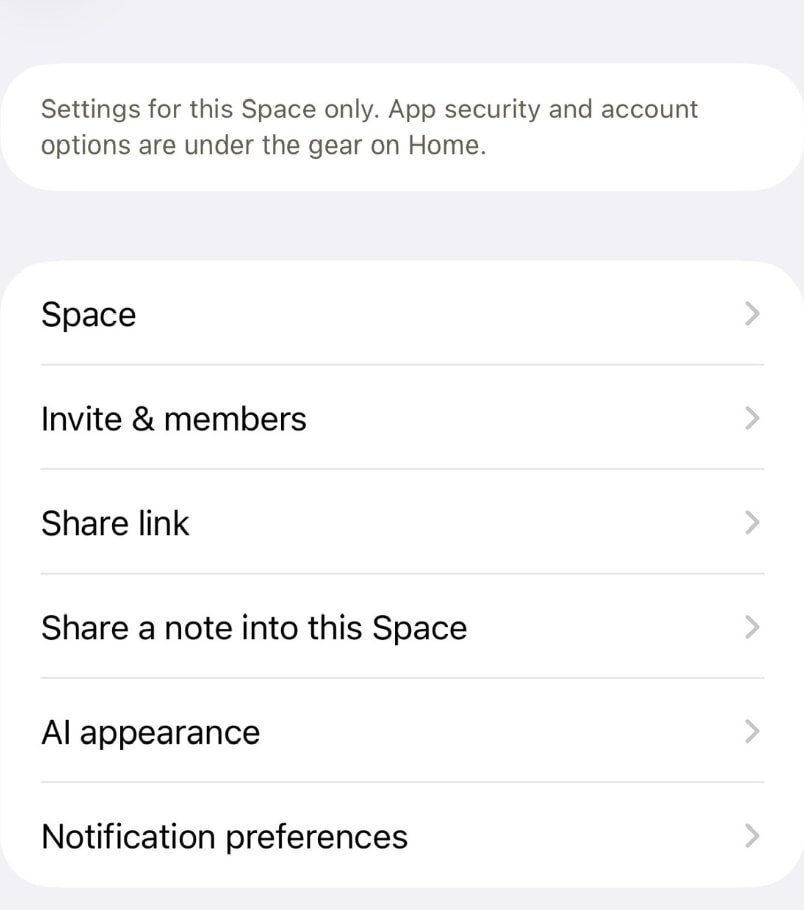
Space settings in Souvéa with options for the Space, invites and members, a share link, sharing a note into the Space, AI appearance and notification preferences.
DESIGNED TO ENABLE

Connect a Space with a wider context.

A Zone can connect people and Spaces with relevant information, services and knowledge around a place or shared interest.

When you visit a city, a Zone could bring local transport times, nearby services, events and trusted local information into Souvéa. You choose whether to use it and what, if anything, you share.

A Zone does not receive access to your private personal context.

EXPLORE SPACES AND ZONES

VISIBLE CONTROL

Control should be a feature, not only a promise.

See what is connected, which AI processed a request, what enters memory and what becomes shared.

  • Connections

    Choose which sources Souvéa can use.

  • Memory receipts

    See what Souvéa has remembered and why.

  • Action policies

    Decide which actions require approval.

  • Space boundaries

    See what remains personal and what has been shared.

LIMITED ACCESS

Choose how active Souvéa may be in your email.

Choose whether Souvéa quietly captures selected email threads, helps you privately or participates only when openly copied and directly addressed.

Personal GmailWork Outlook
  • Silent recorder

    Souvéa captures only the threads you bring to it and does not reply unless asked.

  • Private assistant (selected in this example)

    Souvéa can privately brief you, identify actions and draft replies when requested.

  • Public assistant

    Souvéa can participate when openly copied and directly addressed. Forwarded and BCC email remains private.

Email behaviour settings, recreated with example accounts.
READ ABOUT YOUR DATA AND CONTROL

PERSONAL AI IN THE REAL WORLD

People across leading universities are already putting personal AI to work.

  • Stanford University logo
  • Northwestern University Kellogg School of Management logo
  • Cal Poly logo
  • University of Michigan logo
  • Goethe University Frankfurt logo
  • University of Washington logo
  • Queen Mary University of London logo
  • University of the Arts London logo
  • Stockholm University logo
  • University of California, San Francisco logo
  • University of Nottingham logo
  • University of Copenhagen logo
  • Luiss University logo
  • Pepperdine University logo
  • Berkeley City College logo
  • University of Oulu logo
  • California College of the Arts logo
  • KU Leuven logo

Logos indicate organizations represented among members of the Prifina personal AI community. They do not necessarily imply adoption across an institution, procurement, partnership or endorsement.

BUILT ON PRIFINA

A personal AI needs a foundation designed around people.

Souvéa is built by the team behind Prifina, which develops personal data and intelligence models so people can use different AI capabilities without giving one platform permanent control over their context.

Mastercard logo

Prifina is exploring new models for personal AI with Mastercard.

EXPLORE THE TECHNOLOGY BEHIND SOUVÉA

OUR PRINCIPLE

Liberty. Equality. Data.

People should remain free to control their data, choose the AI that works with it and participate on equal terms.

Make personal AI work your way.

Start with one connection, one question or one Space. Add more when it becomes useful.

Available on iPhone and web.

From the Journal

Short reads on getting started, choosing an AI model and working together in Spaces.

  • The Souvéa model picker open in the app, listing supported models from several providers with one of them selected.

    Guides

    Which AI model to use for which task

    There is no single best model. There is a better model for the job in front of you, and the useful skill is knowing when to change.

    Read article

  • The Device sources screen in Souvéa, listing Notifications, Apple Health, Calendar, Reminders, Contacts, Places and Music, each with a connect or connected control.

    Getting Started

    Start with one connection

    The fastest way to understand Souvéa is to connect one thing you already use, then ask a real question about it.

    Read article

Read the Journal